
psychicsoftware
January 23, 2026
Techie, The Necromancer

Pathfinding and Pedestrian Simulation in The Necromancer’s Tale

January 23, 2026
Techie, The Necromancer

Character movement turned out to be one the more complex systems in The Necromancer’s Tale, perhaps unexpectedly (to me). I’ve been working with A* pathfinding for nearly 20 years now (having first discovered it when working on Darkwind), and have taught it to my undergrads for the past 10+ years. It’s at the core of both in-combat and out-of-combat movement of the characters in TNT.


Hexgrids

Hexes are often considered better than squares for turn-based combat games, since hexes are the same distance from each of their neighbours. My code for building these starts from a seed position, which is manually set at a walkable location, and then it searches in all 6 directions using raycasts to see which ways can be walked from this location (i.e. which directions are clear of obstacles). This adds more hexes which are then also searched – we “flood” outwards until all reachable hexes within our predefined region have been added, along with their connectivity to their neighbours.
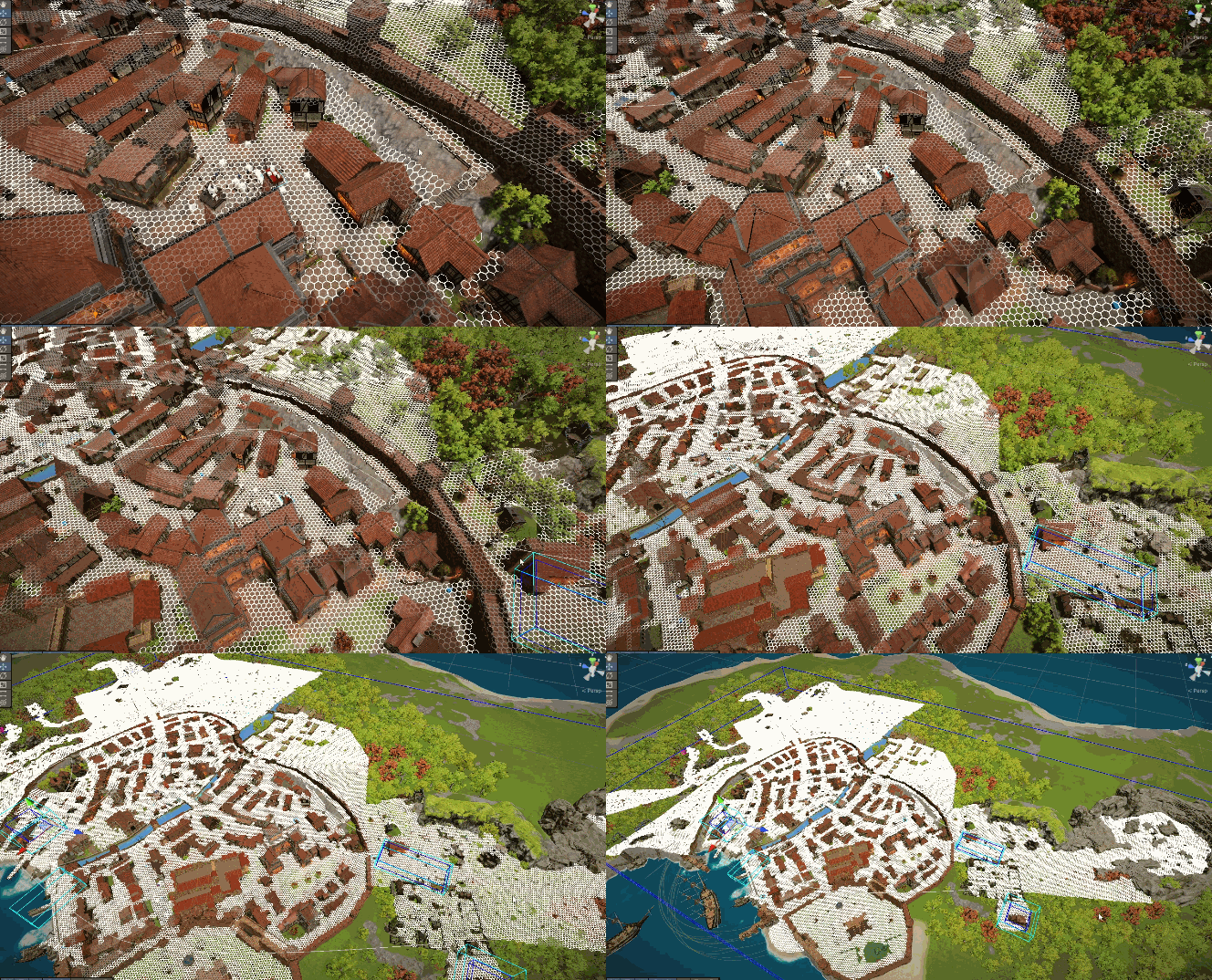
This produces a graph of connected nodes, which is perfect for the A* algorithm. We also need to be able to quickly gather hexes within an arbitrary region of space (without the inefficiency of having to search outwards from the seed location to find them), so hexes are also inserted into buckets which are configured as a sparse 3D array based on 1m x 1m x 1m size. The overworld has 70,000 connected hexes, and each interior/underground location has its own hexgrid. All A* grid loading and pathfinding is performed by multiple threads.


Less Need for Invisible Walls

The player has several options for how to control movement, including mouse-clicking (which uses A* pathfinding to figure out a route around obstacles) and direct WASD or joystick-based control (which does not).

Direct movement (WASD/joystick, where movement is constrained only by collisions) has a problem whereby players might wander away from where you want them to go, and off into the empty wilderness. By cross-referencing the player’s position with the hexgrid, I constrain the player to stay close to the nearest hex – this means there’s less need for invisible walls to stop them wandering off into the wilderness where there is no game content, or from walking inside solid objects when Unity’s rather suspect physics mesh-collisions fail.


Nice things you can do with the G (‘cost’) component of A*

A* is a pretty elegant algorithm for efficiently finding the shortest path between two locations. At its core is a calculation F = G + H, which estimates the distance that a possible solution might take through a given node. The G part of this is interesting: it’s the cost of getting from a node to a neighbour. Often this is simply chosen as the Euclydean distance between the nodes, but it doesn’t have to be.

We can make the G cost higher, for example, when crossing difficult terrain. This discourages the algorithm from picking a route without actually forbidding it. In TNT, I quickly found that the townsfolk loved taking a shortcut through a graveyard, which was often a slightly shorter way of crossing the river between the north and south of the city. This didn’t feel right: the cemetery path is visibly narrow and not well-worn, and crosses a narrow bridge, while the ‘standard’ route is a wider stone bridge leading through the marketplace.

So I added penalty areas – regions of space for which the G cost between hexes is artificially inflated. The cemetery is an obvious place where this works well, but this approach let me fix other areas too, for example narrow gaps between pairs of houses. I also add a per-terrain-texture penalty, so that NPCs tend to walk on cobblestones in preference to grass or sand. This stopped them from taking shortcuts all the time, and kept them to routes that they visibly ‘should’ be using.
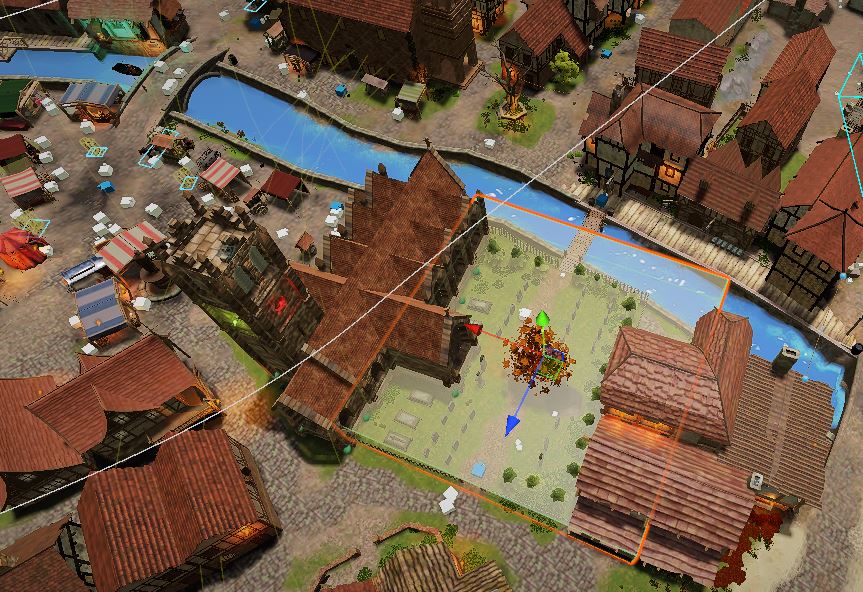
By the way, if you’re wondering about all those white and blue boxes, they are named location markers – NPCs often move between specific locations so this was a good way to lay them out. These markers are also used in the cutscene system, allowing ‘stage directions’ to control character movements synchronised to a conversation or scene. [I wrote a bit about the cutscene system here.]


Believable Pedestrian Movement in Crowded Environments

Once I had a town full of wandering villagers, I needed to make them aware of each other so that they weren’t colliding all the time. Over the several years I was working on this, l had written various last-minute avoidance approaches (basically, over-riding their current A* path trajectory when they were about to collide) so that characters didn’t walk right through each other. It worked okay, but not great: avoidance tended to look very unaware and last-minute.
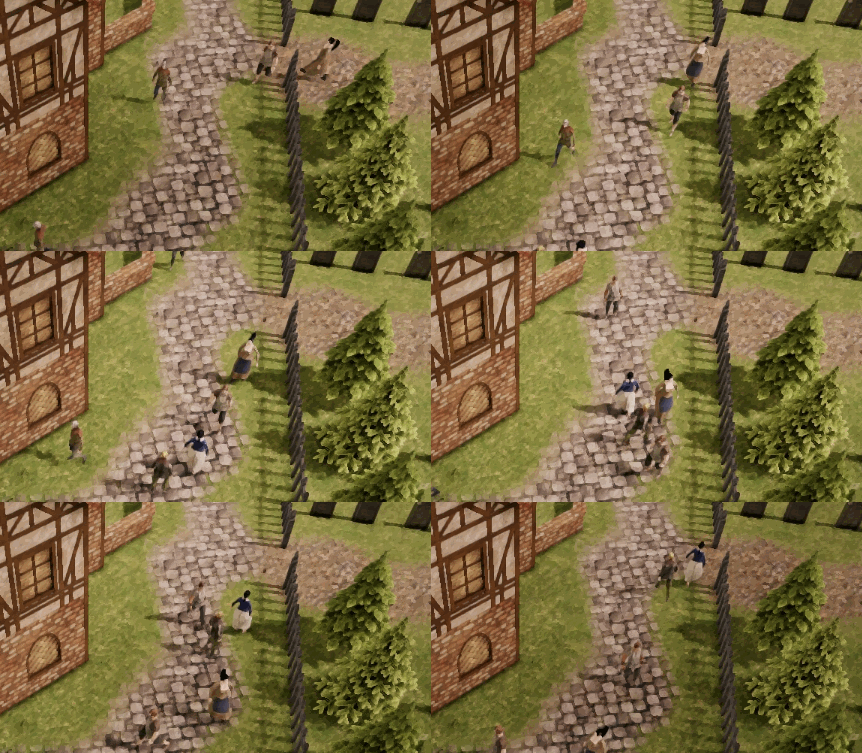
Here in debug mode they’re telling me about random path modifications they make when there’s other pedestrians nearby:
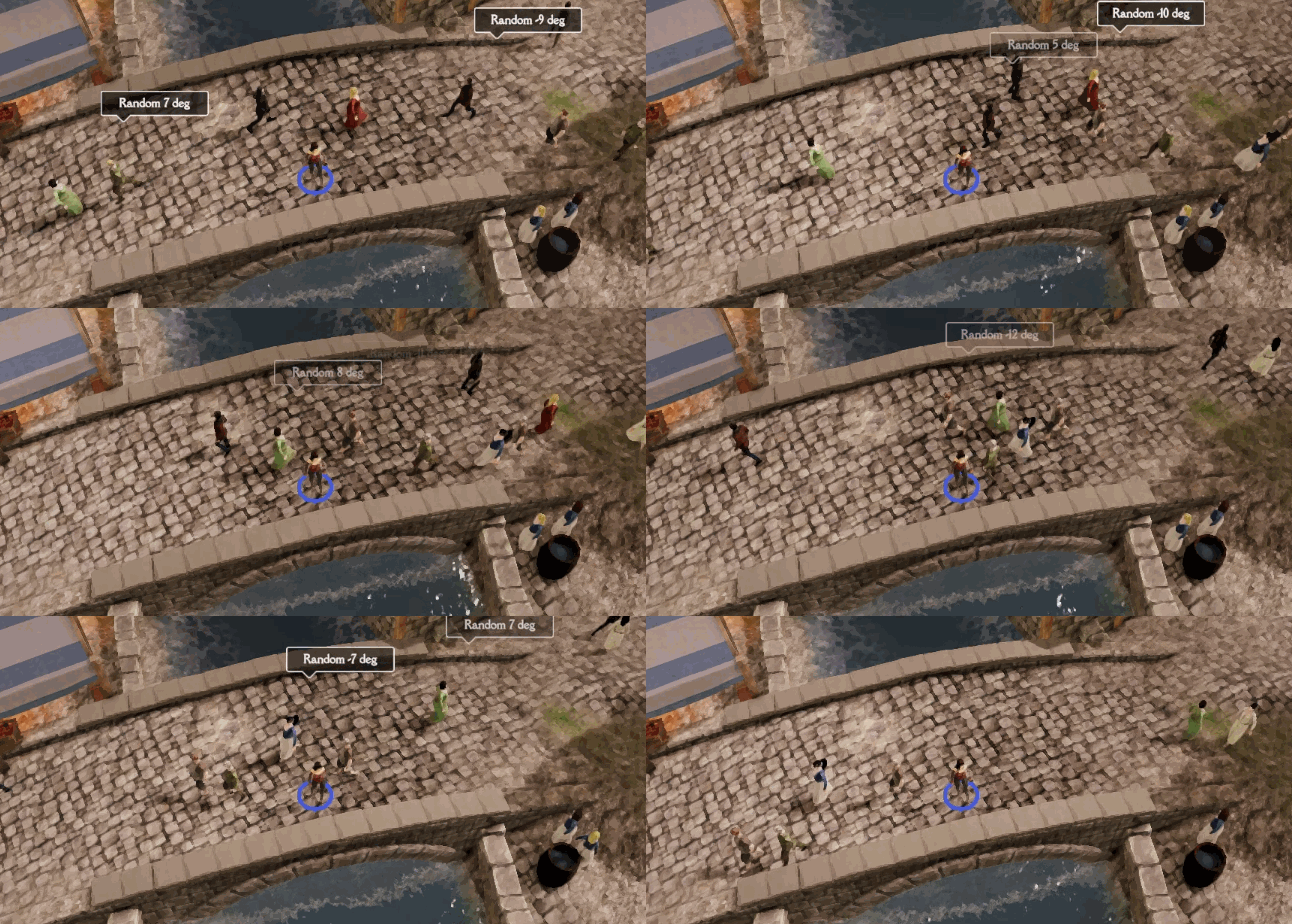
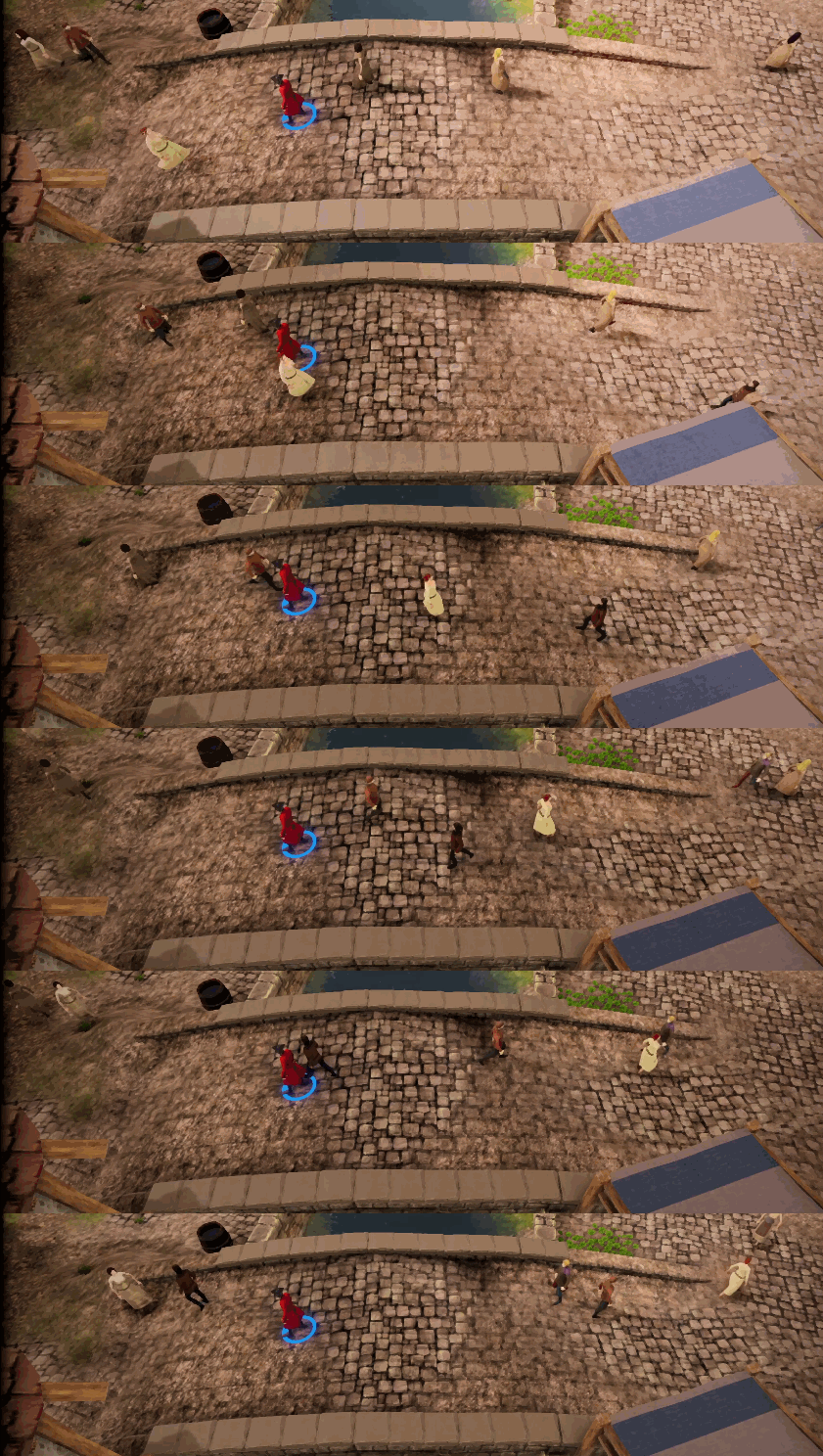
But then I discovered the RVO (Reciprocal Velocity Obstacles) algorithm: see discussion [here] and [here].

This provides a more elegant simulation of all moving characters, each of whom registers their intended trajectory. The paths taken by characters are then modified to avoid collisions several seconds into the future.
 

One Size Does Not Fit All

I had put a lot of effort (3+ years) into massaging my code and its parameters so that it worked well in all circumstances while overcoming recurring problems such as NPCs falling into holes or getting stuck on stairs (are stairs a hole when you’re going down? Are they a cliff when you’re going up?) Given the different sizes and speeds of characters, and the different steepnesses of terrain and stairs, this was a difficult task and perhaps ill-posed, i.e. lacking any single correct answer given the constraints.

My breakthrough came in a very simple form: I started to demarcate areas where the rules behaved differently. When walking on stairs, a character could turn off its hole-avoidance and steep ground avoidance. When going through busy narrow archways, characters could temporarily make their RVO objects thinner, so they don’t get in a muddle all trying to avoid each other. These are simply done as Triggers in Unity. When a character is inside a certain type of trigger, it runs alternative code for specific sections of its movement function.


Other Things I Have Written about Pathfinding

I’ve done some other interesting things with the A* algorithm over the years. [Here’s one from 15 years ago] with [an academic paper I wrote]. I captured data from players in order to make computer-controlled vehicles take ‘sensible’ routes.

January 5, 2018
Godkin, Techie
Leave a comment

High performance networking with a ‘web’ of peer-peer connections in Godkin

January 5, 2018
Godkin, Techie
Leave a comment

Introduction

Godkin is an in-development multiplayer co-op combat RPG, with a maximum of 4-5 players per session, and with high numbers of moving entities (4-5 players each with several AI-controlled followers; several villagers; and potentially 100s of monsters and 10s of defensive towers, missiles and spells active at a time). In order to handle the high amount of network traffic, I have developed an infrastructure involving, at its core, a direct peer-peer connection between each pair of players in a game session.

Peer-Peer Direct Connections

The main motivations behind a peer-peer approach are (i) low latency, and (ii) low server costs. Using peer-peer means that a hosted server is not needed apart from initial handshaking and NAT punchthrough. With 5-10 movement packets per second, per entity, per connected client, the amount of network traffic (and potential server CPU load) can grow alarmingly.

In my ‘web of direct connections’ approach, the player who starts up a game session listens for incoming connections. The second player to join connects to the 1st player and then itself listens for incoming connections. This procedure continues: each player who joins connects to each existing player’s connections, and then opens its own connection for use by subsequent players. This model means that each player can send and receive data directly with each other player (a traditional client-server setup would of course mean data between players would have to be relayed via the server, i.e. 2 hops rather than 1). Latency is minimised.

In Godkin, we’re using WebRTC data channels for both unreliable data (i.e. entity movement updates) and reliable data (i.e. game/entity states and event data).

Client-Server Fallback

The trickiest thing about peer-peer networking on the public internet is the fact that each client will be sitting behind a router which will probably not allow unsolicited incoming traffic, and in any case without manual configuration will not know where to route that traffic to, in its private network. The solution is NAT punchthrough which involves both clients connecting to a publicly-addressable server, and then (via data from the server) negotiating connections directly to each other through the same port that the other client just opened to the server. It’s a somewhat messy process and a small fraction of routers pretty much refuse to do it. Therefore, a fallback is needed whereby clients who have failed to achieve peer-peer connection will relay data to each other via a traditional server. In Godkin, we use UDP (for unreliable data) and Websockets (for reliable data) as a fallback. The exception is the game’s public hub where there can be larger numbers of clients, with players joining/leaving at a high rate: here, we use server-relaying all the time.

Scoping

The idea behind scoping is that certain data is less relevant to a player if it related to a game entity that is far away from their camera. The main data that can be culled through scoping is position updates (which are also overwhelmingly the most frequently sent types of data). Since Godkin is a 2D topdown/isometric game, it’s easy to decide whether a particular world position is visible to other players or not, assuming you know where their camera is located. If a packet is defined as ‘scopeable’, the sending client will typically only send it to other clients for whom it is in-scope. Every 25th packet is sent to everyone, regardless of scope. The exception is data related to Player characters, which is sent without scoping, since everyone needs to accurately know where everyone else’s camera is.

Distributed Control

One further system in Godkin which I have implemented for efficiency reasons is distributed control, by which I pass control of AI entities between clients based on whoever is closest to them. This means that both CPU and network loads are balanced between clients, rather than the game having a heavy reliance on the power and connectivity of the 1st player. In fact, distributed control is also a requirement in order to support scoping: we need to make sure that each client is controlling interactions between entities that are ‘in scope’ for it, i.e. it knows their positions accurately. Since Godkin is a co-op game, we’re not overly concerned about security (although, I have implemented some anti-cheating measures).

Unity3D Implementation

Godkin is being developed using the Unity3D engine, and I was initially developing the networking infrastructure using the excellent Bolt plug-in. Last year, however, the company Photon bought Bolt, and implemented a punitive per-seat cost which is the same as the per-seat cost of their client-server solution, despite the fact that server overhead in a peer-peer situation is a tiny fraction of that in a client-server situation. Unhappy with this, I explored other possibilities and eventually picked a really nice, bare-bones WebRTC plug-in. One of the benefits of moving to a simpler, low-level solution was also that I was able to fairly easily construct the ‘web of connections’ approach as described above, rather than treating the 1st player as a server (which is what Bolt does).

August 11, 2017
Orbs.it, Techie
Leave a comment

Orbs.it — an “agar.io” style game

August 11, 2017
Orbs.it, Techie
Leave a comment

Agar.io and Orbs.it

A couple of years ago, agar.io was released as a browser game, and caused quite a sensation. It has subsequently spawned an entire genre of games — lightweight, massively multiplayer browser games with simple graphics and gameplay. This type of no-nonsense, easy-access multiplayer game appeals to many people, and naturally suits lone developers (especially when their art skills are not great).

So late last year, and early this year, I developed orbs.it

Orbs is a simple to play game, yet is very skillful. It’s about fast and accurate control of your “guns”. Eight players start the game, and each initially control a single orb which is part of a set of 24 orbs encircling a central “sun”. You shoot from your orbs, and when you hit another orb you take control of it. The winner is whoever is left last in the game. It’s a very satisfying mechanic, especially when you get in the flow and claim orb after orb in rapid succession.

Lots of users

In May I released orbs.it on iogames.space which is the main portal for “agario-style” games. I was pleasantly surprised with the amount of players that clearly seek out this type of game — within a couple of days, my server was starting up 5-10 game sessions per minute, each with typically 4 or 5 humans in (the rest being bots). As of right now, there are nearly 90,000 player accounts in the game’s database.

Server architecture

Orbs proved to be a nice test-bed for the nodejs-based gameserver cluster I had developed. The central masterserver looks after player logins and communicates with gameservers which run the actual game sessions. It monitors the number of games running on each server, and dynamically starts/stops server instances as required, to deal with varying loads. There’s also some interesting requirements around things like gameserver hot-patching, so again this has involved developing useful techniques which I’m sure I will use again. I have done this sort of thing before in Darkwind of course, but the system in Orbs is generally much slicker and didn’t suffer from the horrible nightmares of blocked sockets which afflicted Darkwind on its opening weekend on Steam.

Networking

High-speed networked gaming is always a challenge to develop, and a particular challenge for “agario-style” games is that they are generally limited to using websockets for their communications. Websockets provide really handy bidirectional communication between browser and webserver, so are far better than plain-old Ajax.. however, they are still based on TCP, and that means guaranteed, ordered delivery of packets. This is the main cause of sudden spikes in latency which most Websocket games suffer from. The latency is basically unavoidable – it happens when a packet fails to deliver and has to be re-delivered, and all subsequent packets are cached on the receiver until such time as the missing packet arrives, so that they can be delivered to the receiving application in the correct order. This makes TCP fundamentally unsuitable for fast-moving data, especially when the nature of the data is that late packets are irrelevant. If your application knows where a player’s orb is at time 20 in a game, it really doesn’t care to know where it was at time 19, yet TCP doesn’t allow your application to see the data from time 20 until the data from time 19 is received.

Deterministic positioning of orbs

I wanted orbs.it to be, as far as possible, immune to the latency problems caused by TCP. I didn’t want the field of orbs to jump around and glitch on the screen, like the player-controlled entities in most agario-style game do. The solution was to remove player-control of the orbs altogether – this also fitted the design requirement of simplicity. The orbs move around in orbits, based on elliptical paths with continually changing parameters (and ultimately controlled by Sin and Cos, of course). The real trick is that these paths, although interesting and varied (leading to a continually-shifting playfield) are entirely deterministic. At any specific time after the game has started, the game server and game clients can all calculate and precisely agree on where each orb is. This vastly simplifies things and gets rid of many of the difficulties associated with everything a game client knowing about everyone else being out of date by the time they know it.

If you’re interested to read more about fast-paced multiplayer networking, this is an excellent overview.

You can play orbs straight from your browser here: orbs.it and it’s also available on the Android and iOS app-stores, although has not seen much traction there.

May 9, 2017
Godkin, Techie
Leave a comment

Faking Shadows and Lights in a 2D ‘isometric’ Game

May 9, 2017
Godkin, Techie
Leave a comment

For the past few months, I have been working on Godkin, a pixel-art online co-op combat RPG. This is a collaboration between Psychic Software and Goblin Portal (our second collaboration, in fact, following up on last year’s release Goblins & Grottos).

Godkin takes a “faked 3D” view (this style is often referred to as isometric, although actually we’re not adhering correctly to the strict viewpoint that would make the game isometric.) Getting the lighting and shadows looking good in this style is somewhat challenging, since there’s no real 3D geometry for the game engine to work with. I’m having a lot of fun programming this game in Unity (it’s my first Unity game) and figured a blog post about shadows and lights was in order!

At the core of my shadowing system are the FakeShadowCaster and LightAnimator components.

LightAnimator

A LightAnimator component is attached to any objects that have lights – camp fires, torches, explosions, etc. These search for nearby objects which have FakeShadowCaster components, and register with them. They also notify the FakeShadowCaster objects whenever changes happen (e.g. the light moving, flickering, brightening, dimming, turning off).

FakeShadowCaster

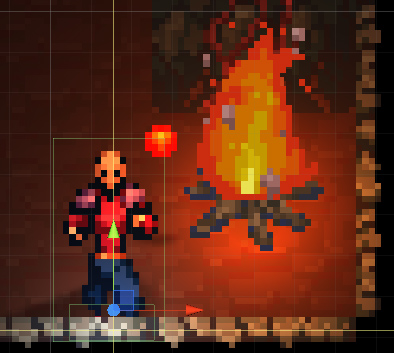
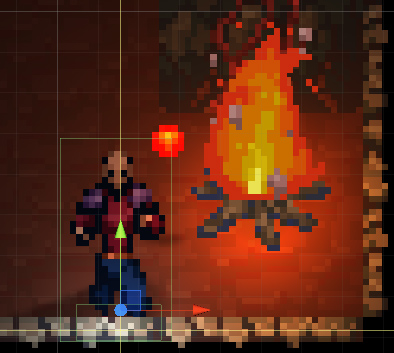
A FakeShadowCaster component is attached to any objects that we need to cast shadows – basically, anything that should appear to have some 3D ‘height’ – characters, monsters, rocks, trees. This component maintains a list of nearby light sources, and creates a fake shadow sprite to associate with each of them. Whenever a light notifies a change, or if the FakeShadowCaster itself moves, its list of shadows are re-calculated. Each shadow is rotated to face away from the associated light source, and its opacity is set based on distance from the light (plus other variables). I also wrote a ‘shadow skew’ shader which spreads apart the vertices of the shadow sprite which are further away fromTree Shadow the light source – with a stronger effect the closer it is to the light; this adds quite well to the overall feeling of 3D. Another nice touch is that we can use whatever sprites we like for the shadows – so trees, for example, can have their shape baked into their file.
‘3D’ Object Shader

The standard Unity sprite shaders look great for terrain, and sprites which don’t have much ‘height’ – however, since the amount that each of their pixels is lit is simply based on the distance they are from light sources, this starts to look strange for objects that are supposed to be tall. The problem is that the top pixels and bottom pixels of the object will be at quite a different distance from the light – but to look like a proper object with height, the vertical position of all pixels should be considered the same, for lighting purposes. So here we have a shader that attentuates light to all pixels based on the position of the vertically lowest ones. This shader also reduces the brightness of any object which is in front of lights (since in this case the majority of the light should be cast on the non-visible ‘back’ of the objects).

If you’d like to follow the progress of Godkin’s development, here’s our blog. Or why not join us for a chat in Discord?

Next Page

Newsletter

Join Email Newsletter

 
We take your privacy seriously and will never give your details to anyone else.

Presskit

Press Kit here

Games in Development

  • The Necromancer's Tale
  • Newby Chinese

Games Released

  • Darkwind: War on Wheels
  • Let's Break Stuff!
  • Musclecar Online
  • Goblins & Gottos
  • Orbs.it
  • Mars Defender
  • Demon Pit
  • Afterburn 2150
  • Block Rockin'
  • More on Gooogle Play
  • More on iOS Appstore

Unfinished Projects “On Hiatus”

  • Zed's Dead
  • Ping Pong Planets
  • Godkin

Archives

  • January 2026
  • October 2025
  • March 2025
  • August 2024
  • December 2023
  • June 2022
  • April 2022
  • May 2021
  • December 2020
  • November 2020
  • October 2020
  • August 2020
  • May 2020
  • March 2020
  • October 2019
  • October 2018
  • August 2018
  • July 2018
  • January 2018
  • September 2017
  • August 2017
  • May 2017
  • July 2016
  • May 2016
  • April 2016
  • December 2015
  • November 2015
  • September 2015
  • July 2015
  • May 2015
  • April 2015
  • February 2015
  • January 2015
  • December 2014
  • October 2014
  • August 2014
  • January 2014
  • December 2013
  • September 2013
  • July 2013
  • May 2013
  • April 2013
  • March 2013
  • December 2012
  • October 2012
  • August 2012
  • June 2012
  • May 2012
  • April 2012
  • March 2012
  • February 2012
  • January 2012
  • November 2011
  • October 2011
  • September 2011
  • August 2011
  • July 2011
  • June 2011
  • May 2011
  • April 2011
  • March 2011
  • February 2011
  • January 2011
  • March 2006
  • February 2006
  • January 2006
  • November 2005
  • October 2005
  • September 2005
  • August 2005
  • July 2005
  • December 1995

Categories

  • Afterburn 2150
  • Block Rockin'
  • Conferences & Events
  • Darkwind
  • Dead By Dawn
  • Demon Pit
  • Game Musings
  • Goblins & Grottos
  • Godkin
  • Guest Posts
  • Let's Break Stuff!
  • Mars Defender
  • Monster Melee
  • Musclecar Online
  • Newby Chinese
  • Orbs.it
  • PC Gamer
  • Rock Paper Shotgun
  • Techie
  • The Necromancer
  • Uncategorized
  • Zed's Dead

CyberChimps WordPress Themes

PSYCHICSOFTWARE | Psychic Games Ltd.
Sam Redfern indie games developer and university academic